The cut, compared
ClipBrook is not a background remover in the usual sense. Background removers run a matting model: it looks at your image, guesses where the subject ends, and paints a transparency mask. The guess works on any photo, which is why those tools exist. The one measured on this page runs a shrunken copy — the library feeds the model a 1024 by 1024 version of whatever you give it and scales the mask back up, so a 4096 px render is cut from a quarter-scale guess. That was read out of the library’s own code, and it is the mechanism behind most of what the crops below show. ClipBrook does something narrower. It measures the background color from the border of your render, then solves every edge pixel as a mixture of subject and background: a pixel that is 40% background becomes 40% transparent. There is no model in the loop and no downscaling, so a 4K render is cut at 4K.
Solving mixtures rather than predicting masks changes what survives the cut. Half-transparency stays half-transparent, so glass, thin petals and watercolor washes come out partly see-through, where a mask can only keep a pixel or delete it. Spill comes off instead of being cut around: a subject in front of a large blue field catches blue bounce light on its rim, and the keyer removes that tint by comparing each edge pixel against clean subject color sampled just inside the edge. Enclosed gaps get their own pass. Renderers shade the hole in a wreath or the space between leaves the way a real cavity receives less light, so the background in there is a darker, different blue; ClipBrook looks for those pockets and clears them instead of leaving gray-blue fog in every opening.
The same 400 pixels, three ways
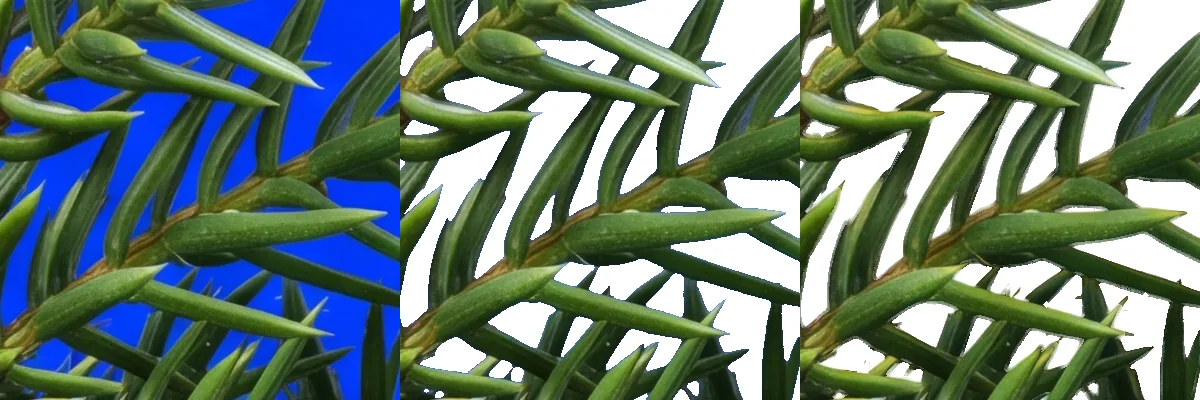
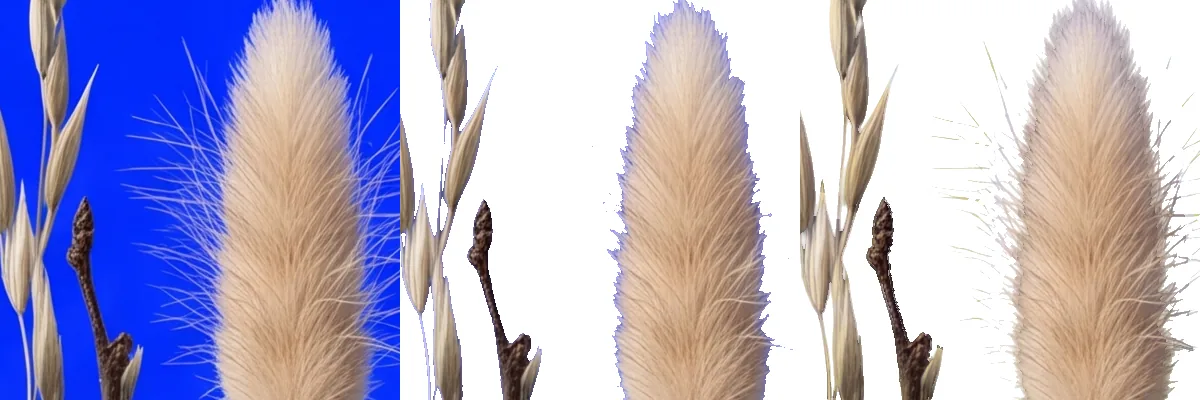
Each strip below shows one 400x400 region at native resolution from a real 4096 px render. Left: the source. Middle: the simple threshold a quick script would use, which calls a pixel background when its key channel is more than 1.5 times the larger of the other two, with no partial transparency, shown on white. Right: the ClipBrook cut of the same region, also on white. The middle pane is the real output of that rule; nothing was done to make it worse.

Against a matting model
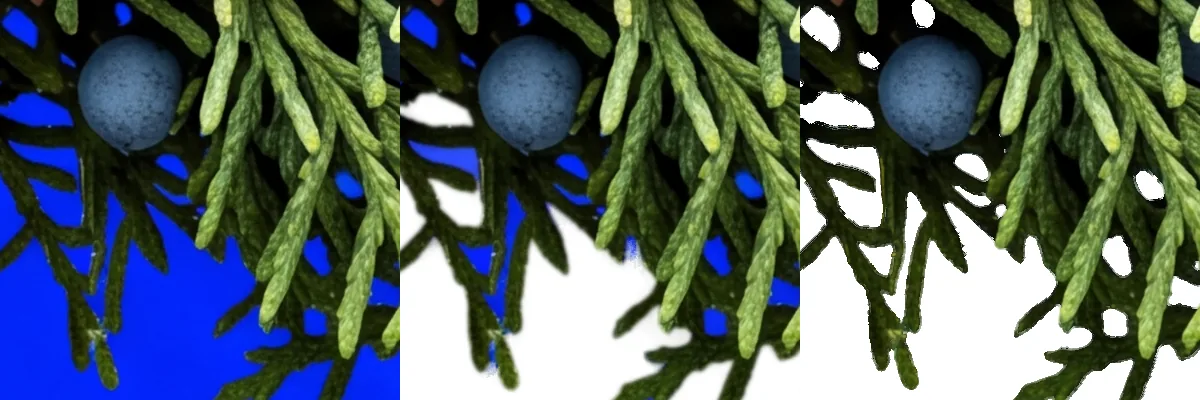
A simple threshold is a low bar, so the same renders went through a matting model as well. The model is birefnet-general, an open general-purpose matting model, running on this machine through rembg 2.0.78 on a Dml device. It got the same full-size files the keyer got.
Two facts set the boundaries of what these pictures say. Every render here was made on one flat blue key color, and that is the only case this section covers; a photograph has no key color, so the model wins there and the keyer has nothing to solve. The second is the mechanism: the model reads a 1024 by 1024 copy of each 4096 by 4096 render, so the mask it returns is scaled back up by 4 before it becomes transparency. That number is read out of the code path that produced these files.
The model ran twice over every render, once plain and once with the alpha-matting post-process rembg offers, and the result published below is whichever of the two came out better for the model. That was the alpha-matting run on all three, which is also the slow one: 63.8 seconds per render on this machine, against 17.2 for the keyer driven from the command line, a figure that also carries a PNG decode and a PNG encode that neither model figure does. Turn the post-process off and the model takes 4.4 seconds, which makes it the quicker engine here by a wide margin — and that average still carries the model’s one-time start-up on the first render, so on a batch it is quicker again.





How this run was made
Weights BiRefNet-general-epoch_244.onnx, licensed MIT. Run through rembg 2.0.78 on onnxruntime 1.24.4, provider DmlExecutionProvider, on AMD Ryzen 7 5700X (8C/16T), 32 GB RAM, Radeon RX 7700 XT, Windows 11 Pro 26200, 2026-08-21. Source renders 4096 by 4096 px; model input 1024 by 1024 px; returned mask scaled up 4 times. Everything else is the defaults each side ships with. The crop windows were chosen by counting disagreeing pixels, not by eye, and their coordinates are in the captions so the same windows can be cut again.
What ClipBrook cannot do
It does not work on photographs. A photo has no key color to remove. The same goes for any render whose background is a scene, a texture or plain white: the arithmetic needs one solid color to measure. Use a matting tool for those, because a guessed mask beats an equation with nothing to solve.
The other limit: when the key color turns up inside the subject itself, the keyer removes it there too, since it cannot keep a color it is deleting. The quality check on each cut reports that case, and the prompt guide explains the re-render on a different key color that fixes it.
How we measured
The engine is a TypeScript port of the Python keyer I run my own stock pipeline on. In its reference blur mode it reproduces the Python original pixel for pixel on all thirteen golden test renders: every intermediate mask matches with no differing pixel, and the finished alpha and color match everywhere. The production build swaps that blur for a faster box approximation and is held to measured per-stage tolerances against the same thirteen.
The per-image seconds quoted above come from the command line on the machine named in the run record, not from a browser. How long a cut takes in your browser depends on the size of the image and on the computer you are using; whatever the figure, the work happens on that computer and your images never leave it.